to eliminate duplicate files of your system
DoubleKiller
Tuesday, March 4, 2008


Saturday, March 1, 2008
Better than Picnik...Fotoflexer.com
http://fotoflexer.com/
Fotoflexer
Most of the tools are for creating fun changes to photos, and users can easily pull and push photos to social networks like Facebook, MySpace and Flickr. But it’s also a serious editing tool (it supports layers, for example).
Additional editing tools - one serious, one fun. The fun one is a morphing tool that lets you take two photos and morph them into a single image.
The second tool takes advantage of some of the recent thinking around seam carving to allow people to intelligently resize photos, and/or remove things in photos without distortion.
Thursday, February 28, 2008
Top free CD/DVD burning apps
Top free CD/DVD burning apps
Just about every computer available these days comes with a CD/DVD burner as part of the package. Whether your primary use for this drive is to make mix CDs for the car, backup data, or burn DVD backups for your movies, you need a good program with the right type of features for the job. Though Windows offers some burning features, you're not going to get the options you'll find in a stand alone app.
There are many paid CD and DVD burning apps to choose from and some of the most popular in this category--like Nero and Alcohol 120%--are probably recognizable by most Download.com users. The only prohibitive trait about these apps (besides cost) is usually they take up too many system resources and offer superfluous features that you may not need for simple burning. I happen to like these apps and some of the extra features are quite useful, but what if you just want something quick and dirty for burning on the cheap?
I did a little research and picked out some top free CD/DVD burning apps that you can download and use for free if you need to get started right away.
CDBurnerXP
The four-paned interface makes moving your media around a snap.
CDBurnerXP is a quick and easy solution for burning audio CDs, creating data disks, and has extra features for ripping your audio CDs and finding track info on the Web. A four-paned interface makes it easy to find and then drag-and-drop files to your chosen media and an included audio player helps you make sure you get the tracks you want. A handy dropbox window lets you browse your files using Windows Explorer and quickly drag-and-drop files to your burn list on the fly. Judging from the user reviews, some users had trouble with CDBurnerXP when burning data DVDs, but I was able to use this function without problems. The developer site offers a list of compatible drives if you have any issues.
JetBee Free
Sometimes an easy way to burn media is all the feature set you need.
JetBee is another free app for burning CDs, DVDs, BlueRay, and HD-DVDs and offers the option to include these burning commands to your right-click contextual menus in Windows. The two-paned interface is simpler than CDBurnerXP, but good enough for most simple burning projects. This is probably the most bare-bones of the bunch as far as extra features, but if you want a quick-burning program to make backups or audio CDs for free, JetBee does the job nicely. As someone who burns primarily audio CDs, I was a little annoyed I had to drill all the way down from the top level for music files, but this might not be a problem for other users.
BurnAware Free Edition
The launch page takes all the guess work out of your burning project.
BurnAware Free Edition is probably the prettiest in the interface department for this collection and offers a step-by-step procedure for your burning projects. A launch window lets you choose the type of project you want and leads you through the process to completion. Navigating your directories is easy with BurnAware's file management system and adding files is as simple as highlighting them and hitting a button. Though you don't have the option of a floating window like CDBurnerXP, BurnAware offers enough features for most burning projects.
Sunday, February 24, 2008
To play any media - DVD, audio
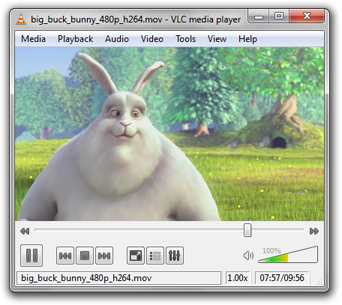
VLC - the cross-platform media player and streaming server
VLC media player is a highly portable multimedia player for various audio and video formats (MPEG-1, MPEG-2, MPEG-4, DivX, mp3, ogg, ...) as well as DVDs, VCDs, and various streaming protocols
Link
Thursday, February 21, 2008

Subscribe to:
Posts (Atom)

